Gallery
- 4.1
- Rating
- 10.00M
- Installs
- Free
- Price

 Analysis by App-foxy
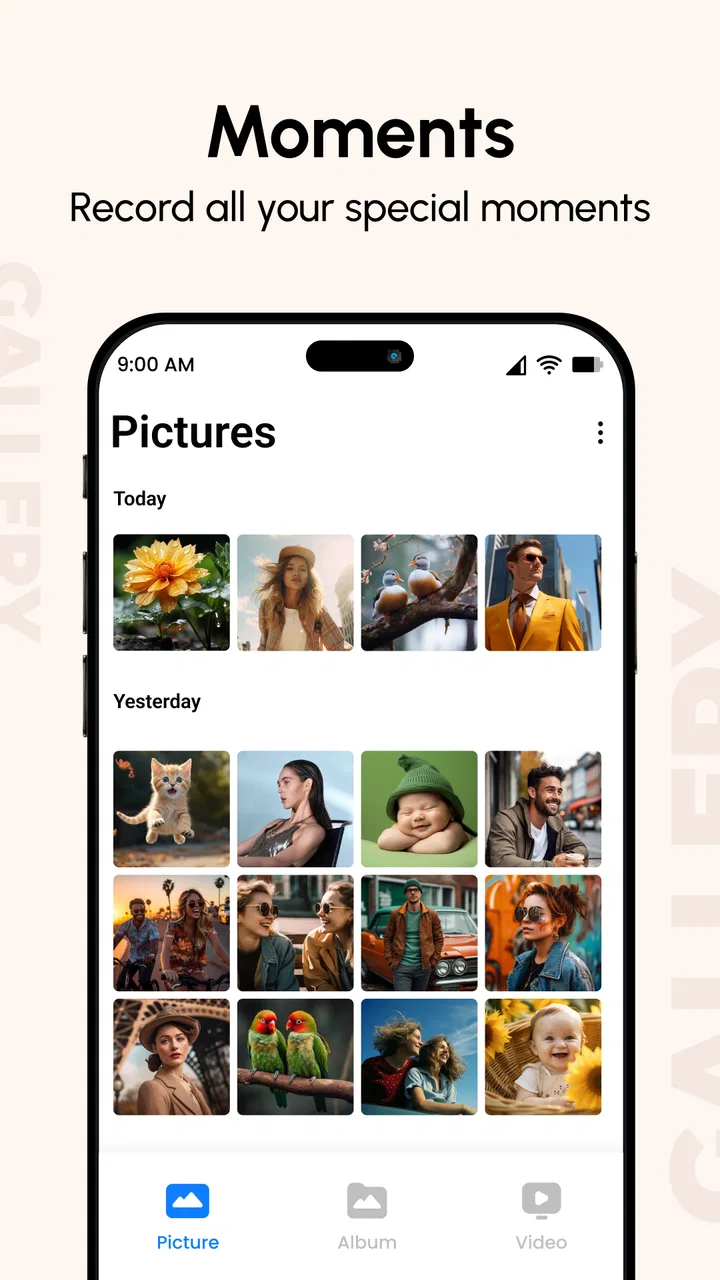
I spent time using Gallery as a straightforward way to browse photos and videos on an Android phone, with the added option of hiding selected media. It sits in the productivity category rather than trying to be a full photo editor or cloud-storage service, and that focus is important: this is mainly a viewing and organizing companion for people who want quicker access to local memories and a little more privacy around personal files.
My first impression was that the app is easy to understand. You open it, see your visual library, and move through photos or videos without having to learn a complicated workflow. That simplicity can be valuable for people who find feature-heavy gallery replacements tiring. At the same time, the experience is not equally comfortable for every user or every situation. The app’s usefulness depends on how clearly your phone presents controls, how much media you keep locally, and whether hiding files is enough for the privacy level you need.
How Gallery feels in everyday use
I find Gallery most useful when it slips into a simple routine: opening a local photo, showing a video, or keeping a few personal images out of casual browsing. The real test is whether that convenience still matters once the novelty of a new gallery wears off. To judge that, I look beyond the first few taps and consider what it asks me to maintain—and what kind of photo habits it can actually support.
You May Also Like

 Blood Strike: 2.5 Anniversary
Blood Strike’s Loadouts Turn Every Drop Into a Tactical Gamble
A close look at Blood Strike’s custom loadouts: how fast access to signature weapons reshapes its battle royale rhythm, rewards preparation, and narrows the gap between fights.

 Pandora - Music & Podcasts
Pandora’s Music Is Easy to Start, but Harder to Recover
Pandora’s strength is its low-effort path from a seed to a station. Its weak spot is how much confidence it asks you to place in connection, setup, and quiet recovery.

 8 Ball Pool
 Is Built on Rivalries, Rematches, and Routine
A close look at the rivalries, rematches, shared routines, and unanswered safety questions that turn a quick pool match into a persistent mobile community.

 Samsung Music
’s Quiet Strength Is Playing What You Already Own
Its reach comes less from spectacle than from dependable access to a personal library. That simplicity is both the app’s strongest retention engine and its ceiling.

 AccuWeather: Weather Radar
AccuWeather Review: A Quick, Clear Forecast for Everyday Decisions
For everyday plans, the best forecast is the one you can understand quickly. AccuWeather makes rain timing, radar, and local conditions easy to act on, with a few trade-offs.

 Hill Climb Racing
Why Hill Climb Racing Still Turns Crashes Into One More Run
A tiny car, a bumpy hill and one more upgrade: Hill Climb Racing keeps resurfacing because its simple chaos makes every near-miss feel personal.
More From Our News Desk



Readable browsing and uncomplicated navigation
The strongest part of Gallery is its direct approach to browsing. Instead of pushing editing tools, social sharing, or cloud features into the foreground, it keeps attention on photos and videos already stored on the phone. For me, that makes the app suitable for quick tasks such as finding a recent picture, showing a family member a video, or checking whether an old image is still on the device.
The developer is listed as Gallery Photos & Videos, and the app has been available since April 13, 2017. Its current version is 3.0.0, while support starts with Android 7.0. That combination suggests a useful advantage for people using older Android hardware: you do not necessarily need a recent phone simply to get a dedicated gallery experience.
Navigation is easiest when your collection is reasonably tidy. If your phone contains years of screenshots, downloads, messaging attachments, and camera shots, any local gallery can become visually busy. Gallery does not magically solve that problem. I found that the app works best when I treat it as a fast viewing layer rather than expecting it to replace a careful file-management routine.
For someone with limited technical confidence, that distinction matters. A simple viewer reduces the number of decisions made before seeing a picture. You are not forced to understand albums, synchronization settings, or editing timelines just to open a file. However, users who depend on detailed sorting, advanced search, automatic categorization, or extensive album controls may find the experience less complete than the gallery already included with their phone.
Text readability is also influenced by the device itself. Android’s display size and font settings can make labels and controls easier to see, but enlarging the interface may reduce how much content fits on screen. I would adjust those system settings before judging the app, especially for an older user or anyone with reduced vision. A clean gallery is helpful, but it cannot compensate for every display or contrast issue on a particular phone.
Useful privacy without pretending to be a vault
The hide-photo and hide-video function is the feature that gives this app a clearer purpose than a basic viewer. I can imagine using it for pictures that I want to keep on the phone but do not want appearing during casual browsing. A realistic example would be storing scans of personal documents temporarily, keeping surprise-party images out of the main stream, or separating private family media from pictures that are safe to show when handing over the phone.
The practical tip is to decide what “hidden” means in your own situation. Hiding an item from the normal gallery view is convenient, but it should not automatically be treated as strong protection against someone who has access to the device and knows where to look. I would use the feature for reducing accidental exposure, not as the only safeguard for highly sensitive material.
This is especially relevant when accessibility and privacy overlap. A person may need to enlarge the screen or ask someone else to help browse photos, yet may not want every private image visible during that assistance. Keeping selected media out of the everyday view can reduce that awkwardness. It is a small workflow improvement, but a meaningful one for shared-device situations.
Motor comfort and sensory demands
A gallery app is often used with short, repeated gestures: tapping a thumbnail, swiping through images, pressing a control, and returning to the collection. That makes the app relatively approachable for people who are comfortable with basic touch navigation. It is less suitable for someone who struggles with precise taps, accidental swipes, tremors, or holding a phone steady for long periods.
One practical approach is to reduce the number of gestures required. I would open the app with the phone supported on a table when reviewing a large collection, use the system’s touch and display adjustments where available, and avoid trying to manage private media while walking or carrying something. These are simple changes, but they prevent a viewing task from becoming a frustrating dexterity test.
For sensory comfort, the visual nature of the app is both its strength and its limitation. Photos and videos are presented as visual content, so people with low vision may need Android magnification, a larger display, or assistance. People sensitive to motion may also prefer to pause videos rather than let them play while browsing. The app can open media, but it should not be mistaken for a specialized screen-reader, low-vision, or sensory-regulation tool.
Audio is another consideration when viewing videos in public or in a quiet room. I would keep the phone muted until I know what is about to play, particularly when showing someone a collection in a shared space. This is not a flaw unique to Gallery, but the app’s uncluttered design makes it easy to move quickly from one item to the next without thinking about the surroundings.
The free price lowers the barrier to trying it, although in-app purchases range from $2.49 to $27.99 per item. I would pay attention to which extra functions are offered before buying anything, rather than assuming every privacy or convenience feature is included at no cost. The basic appeal is the simple local browsing experience; users should decide separately whether optional purchases address a real need.
Situational access: when the simple design helps
Gallery makes the most sense in situations where speed and familiarity matter more than advanced organization. Imagine a relative asking to see pictures from a recent outing. I can open the app, move through the collection, and keep selected personal items out of the ordinary view beforehand. That is less stressful than trying to remember which folder contains each image while another person is waiting.
It can also help on a phone used by more than one person, provided everyone understands that hiding media is a convenience feature rather than a complete security system. A shared family tablet or spare phone may benefit from a cleaner, more neutral gallery view. Someone who uses a phone for work and personal life could also find it useful to keep certain visual files away from the first screen shown during a presentation.
Offline moments are another natural fit for a local gallery. When the needed photos are already on the device, browsing does not depend on finding a particular online account or waiting for a cloud library to load. That can be useful during travel, in places with unreliable service, or for people who prefer not to manage another synchronization system.
There is a trade-off here. Local access is convenient, but it also means the app’s usefulness follows the phone’s storage and file arrangement. If pictures are mainly stored online, on another device, or inside a service that does not expose them as ordinary local media, a dedicated cloud app may be the better choice. Gallery is most convincing when the phone itself is the center of your photo life.
Its Everyone content rating also makes it broadly approachable for general household use. That does not mean every feature or privacy workflow will suit children, older adults, or users with disabilities equally. It simply means the app is presented for a general audience rather than a narrowly restricted one. In practice, I would still set up the phone and explain the hide function before handing it to someone who may accidentally move or reveal media.
Where the usual alternatives may be better
Most Android phones already include a manufacturer gallery, and that built-in option may be the better choice if you want tight integration with the camera, screenshots, albums, editing tools, or device-specific controls. The preinstalled app is also more likely to match the phone’s visual language, which can reduce confusion for someone who relies on familiar buttons.
Cloud-focused photo services are stronger when automatic backup, cross-device access, search, and recovery are priorities. They can be preferable for a person worried about losing pictures after a damaged or replaced phone. Gallery’s local emphasis feels faster and more private for simple browsing, but it does not replace a backup plan. I would not delete the only copy of important photos simply because they are easy to view in this app.
File managers are a better fit for users who need to rename, move, copy, inspect folders, or handle many file types. Gallery is more comfortable for visual browsing than for detailed storage administration. Likewise, a dedicated secure vault may be more appropriate when privacy requirements include stronger authentication or a more formal protected area. The hide option is useful for avoiding casual discovery, but that is a narrower promise.
These comparisons help define the audience. I would recommend Gallery to someone who wants a clean, uncomplicated way to browse local photos and videos and appreciates a basic hide function. I would steer a professional photographer, a heavy cloud user, or anyone managing sensitive records toward a more specialized tool. The app is not weak because it lacks those systems; it is simply aimed at a lighter job.
Remaining barriers and small workflow frustrations
The biggest limitation is that simplicity can become a lack of control. When a collection grows large, finding one specific image may require more browsing than users expect. People who organize their lives around detailed albums, dates, locations, faces, or project folders may feel more efficient in another app. Before switching, I would test the app with the actual size and messiness of my library rather than judging it with a handful of sample images.
Another barrier is the difference between viewing and managing. The store summary describes browsing and viewing photos and videos from the phone, with hiding included. That is a useful scope, but I would not approach it expecting a complete editing studio, backup service, or document-management system. Keeping that expectation clear prevents disappointment and makes the app easier to evaluate fairly.
Privacy can also create confusion. If I hide a picture, I would make a note of the workflow for restoring it later and avoid treating the hidden area as an archive that nobody else can ever access. This is one of the non-obvious habits that matters: privacy features are only helpful if the owner remembers what was hidden and understands how the app presents it afterward.
In-app purchases are another point to consider for families and users who prefer completely predictable costs. The app itself is free, but optional items can cost between $2.49 and $27.99. I would review purchase prompts carefully and avoid unlocking extras merely because they appear during a routine browsing task. For a basic viewer, the free experience should be judged on its own before spending money.
Older Android support is encouraging, but hardware still affects comfort. A small screen, limited storage, slow media decoding, or a crowded notification area can make any gallery harder to use. I would also leave enough free storage for the phone to operate normally, since a gallery cannot make an overloaded device feel responsive. These are practical conditions, not reasons to reject the app, but they shape the real experience.
My inclusive verdict
Gallery is a sensible choice for people who want an uncomplicated Android photo and video viewer with a way to keep selected items out of ordinary browsing. Its free entry point, general-audience rating, and support for Android 7.0 make it approachable across a broad range of devices. The app has also built a substantial user base, with more than 10 million installs, a 4.1 average rating, and roughly 94 thousand ratings, so it is clearly not an obscure experiment.
What I like most is the narrowness of the experience. I can understand the purpose quickly, use it in a shared or public setting with a little preparation, and avoid the clutter that often comes with more ambitious photo platforms. The hide function adds real everyday value when the goal is preventing accidental exposure rather than creating a high-security vault.
I would skip it if I needed automatic backup, advanced search, serious album management, professional editing, or robust protection for confidential files. I would also test the navigation with the intended user if motor or vision difficulties are significant, because a simple gallery is not automatically an accessible gallery. Android’s own display and assistance settings may be essential parts of the setup.
For the right person, though, Gallery is easy to recommend: use it as a calm local viewer, keep expectations realistic, and treat hidden media as discreet rather than invulnerable. That combination makes it a practical productivity app for everyday photo access, especially when clarity and quick browsing matter more than a long list of advanced tools.
FAQs for Gallery
01What features does the Gallery app offer for photo organization?
The Gallery app provides a variety of features for organizing photos, including automatic sorting by date, customizable albums, and the ability to tag and categorize images. It also offers options for creating slideshows and editing basic photo attributes, ensuring users can manage their collections efficiently.
02Is the Gallery app compatible with both Android and iOS devices?
Yes, the Gallery app is designed to be compatible with both Android and iOS platforms. It ensures seamless functionality across devices, allowing users to access and manage their photo collections regardless of the operating system they are using.
03How does the Gallery app handle photo privacy and security?
The Gallery app takes privacy seriously, offering features such as password-protected albums and encrypted storage. Users can also choose to hide specific images from the main gallery view, ensuring sensitive photos remain private and secure from unauthorized access.
04Does the Gallery app support cloud backup, and how does it work?
The app supports cloud backup, allowing users to sync their photos with popular cloud services. This ensures that images are safely stored and can be accessed from any device. Users can set up automatic backups or manually upload photos to the cloud, providing flexibility and peace of mind.
05Are there any in-app purchases or ads within the Gallery app?
While the core features of the Gallery app are free, it does offer in-app purchases for premium features such as additional storage, advanced editing tools, and ad removal. Users can choose to upgrade for an enhanced experience, but the basic functionalities are accessible without any cost.
Pros
- User-friendly interface enhances navigation.
- Supports various media file formats.
- Efficient photo organization with albums.
- Offline access for viewing without data use.
- Cloud sync for seamless backup and restore.
Cons
- Limited editing tools for advanced users.
- Occasional ads can interrupt experience.
- Requires permissions that some may find intrusive.
- Lacks integration with certain third-party apps.
- No built-in feature for photo recovery.

Gallery
Gallery